Using Laya-Pro
The engine in detail: installing it, the command line, routing, batches and long documents, confidence and abstention, question types, and the HTTP and MCP servers. The README has the overview, the benchmarks and the quickstart; Limits has what the models do not do well; Decision consistency covers the decision cache.
Installation
Python 3.10 or newer (huggingface_hub 1.x, transformers 5.x and torch 2.14 set that floor).
Laya-Pro installs from its repository; pip install laya from PyPI installs the original Laya,
without Laya-Pro's changes. Git must be installed.
python -m pip install "laya-pro @ git+https://github.com/tgundhus/laya-pro.git"
python -m pip install "laya-pro[serve,onnx] @ git+https://github.com/tgundhus/laya-pro.git"   # with extras
python -m pip install -e .                                                           # a source checkout
Extras: serve (HTTP server), mcp (MCP server), onnx (ONNX Runtime), langchain (LangChain and
LangGraph), llamaindex, crewai, structured (pydantic models for decide) and fast (the
TileLang GPU fast path).
In a new virtual environment. On macOS or Linux:
python3 -m venv .venv
.venv/bin/python -m pip install "laya-pro @ git+https://github.com/tgundhus/laya-pro.git"
.venv/bin/python -I -c "import laya; print(laya.__version__)"
On Windows PowerShell:
py -3.11 -m venv .venv
.\.venv\Scripts\python.exe -m pip install "laya-pro @ git+https://github.com/tgundhus/laya-pro.git"
.\.venv\Scripts\python.exe -I -c "import laya; print(laya.__version__)"
The last line prints the installed version without loading a checkpoint; -I keeps a source copy
in the current directory from masking a missing installation. On Debian or Ubuntu the system Python
may need sudo apt install python3-venv first.
With uv:
In a uv project, add it as a dependency with uv add "laya-pro @ git+https://github.com/tgundhus/laya-pro.git".
uv pip also takes --torch-backend=auto (or a named backend such as cpu) to install the PyTorch
build that matches the machine.
A specific PyTorch build. For a CPU-only or a particular CUDA build, install PyTorch first with its installation guide, then Laya-Pro. For an Intel GPU (XPU), install a supported driver and an XPU build of PyTorch first:
.\.venv\Scripts\python.exe -m pip install torch --index-url https://download.pytorch.org/whl/xpu
.\.venv\Scripts\python.exe -m pip install "laya-pro @ git+https://github.com/tgundhus/laya-pro.git"
.\.venv\Scripts\python.exe -c "import torch; print(torch.xpu.is_available())"
Laya picks an available XPU when no device is given; device="xpu" in laya.load() or
Router(device="xpu") asks for it explicitly.
Troubleshooting.
ModuleNotFoundError: No module named 'laya': install and run with the same virtual environment's Python, and select that interpreter in your editor.- Missing
rl_agent_config.json: it ships with each checkpoint, besidemodel.safetensors. For a local model, pass the directory that holds both. - The first use of a checkpoint downloads it from Hugging Face;
Router(preload=True)loads all three when the Router is built.
To try the Python SDK in a CPU container instead, see the Docker Compose quickstart: it runs a sample request and keeps downloaded models between runs.
macOS, including Intel Macs
PyTorch stops publishing macOS x86_64 wheels at 2.2.2 (2.3 and later are Apple-silicon only),
while transformers 5.x requires torch >= 2.4 and torch 2.2.2 was built against NumPy 1.x. A plain
pip install "laya-pro @ git+https://github.com/tgundhus/laya-pro.git" on an Intel Mac therefore resolves a stack that cannot run — torch 2.2.2 with
transformers 5.x and NumPy 2.x, and torch fails to initialise NumPy 2, which predict() needs for
its final .numpy() conversion. Pin the stack:
pip install "numpy<2" "torch==2.2.2" "transformers==4.57.6" "laya-pro @ git+https://github.com/tgundhus/laya-pro.git"
transformers 4.57.x is the last 4.x line and the newest one that runs on torch 2.2.2. The
transformers-5 checkpoints load on it unchanged: build_model maps their rope_parameters onto
the RoPE attributes 4.x reads, which mmBERT needs because both of its bases are 160000 rather
than the 4.x defaults. Apple-silicon and CUDA machines need none of this pinning.
Running from this checkout
setup_laya.sh stands the whole thing up in the checkout: an isolated .venv with the pinned
stack, the three checkpoints under models/ (gitignored, ~2.3 GB), and a verification run. It is
idempotent, so re-running only fills in what is missing. The numbers below are from the machine it
was developed on — an Intel Mac Pro, no CUDA, AMD Radeon GPUs reachable through Metal (MPS); the
script itself is not Intel-specific. Commands are relative to the repository root.
./setup_laya.sh                                    # venv + pinned deps + checkpoints + verify
.venv/bin/python verify/laya_smoke_test.py --models ./models            # real weights, device auto -> MPS
.venv/bin/python verify/laya_smoke_test.py --models ./models --device cpu
.venv/bin/python verify/numerics_check.py          # RoPE bases, determinism, SDPA vs eager
.venv/bin/python verify/bench_devices.py           # CPU vs MPS, thread scaling
.venv/bin/python verify/edge_sweep.py              # edge cases: option budgets, truncation, router lifecycle
.venv/bin/python verify/checkpoints.py             # weights vs the recorded sha256 hashes
.venv/bin/python verify/soak_check.py              # drift, RSS and concurrency over 200 calls
.venv/bin/python tests/test_local_e2e.py ./models             # the repo's own e2e suite
./examples/run_all.sh                              # all 41 examples, pass/fail
Measured here, one predict() call answering 4 questions about a short email (median of 10,
after warm-up):
| checkpoint | CPU (28 threads) | MPS (Radeon Pro Vega II) |
|---|---|---|
laya (421M) |
453 ms — 113 ms/question | 146 ms — 37 ms/question |
laya-multilingual (322M) |
192 ms — 48 ms/question | 121 ms — 30 ms/question |
laya-typed-decisions (421M) |
441 ms — 110 ms/question | 145 ms — 36 ms/question |
MPS is 1.6-3x this 56-core CPU and matches the T4 reference quoted below (32.8 ms/question for
laya-multilingual). CPU-only work runs fastest around 16 threads (OMP_NUM_THREADS=16); the
default 28 already over-subscribes. The first MPS call pays ~13 s of Metal kernel compilation,
so warm up before timing. Individual runs move by a few percent with machine load.
To keep the router fully offline, point it at the local checkpoints rather than the hub repos:
from laya import Router

router = Router(models={"english": "models/laya",
                        "multilingual": "models/laya-multilingual",
                        "typed-decisions": "models/laya-typed-decisions"},
                preload=True)
Full notes — version rationale, the two portability fixes this needed, and every verification
run — are in LOCAL_SETUP.md.
Command line
Installing the package also installs a laya command for quick local testing, no script needed:
laya "I was charged twice, please refund"            # routing decision only; works offline, no download
laya "Refactor this service" --predict               # full answers (downloads the checkpoint on first use)
laya "Mein Konto wurde zweimal belastet" --lang de   # force a language instead of detecting it
laya "My payment failed twice" --lang-guess en        # a soft hint: nudge routing, still fall through to detection
laya "My payment failed twice" --model ml            # pin a checkpoint: names, aliases and casing all resolve as the SDK resolves them
laya "My payment failed twice" --preset triage       # answer a ready-made preset (triage, email, guard, moderation, router)
laya --batch tickets.txt --predict                   # score a file of requests, one per line, in one batch
cat tickets.txt | laya --batch - --predict --json    # stdin; one JSON line of answers per request
laya "Where is my card" --questions intents.json     # answer your own questions, written in a JSON file
laya "Refund my card" --predict --min-confidence 0.9 # mark an answer the model is unsure of
laya                                                 # interactive mode
--lang is decisive: a real code picks the checkpoint and skips detection. --lang-guess is the
soft sibling core checks in between, so a probable-but-uncertain language can nudge routing without
forcing it — and a hint that resolves to nothing falls through to the built-in detector, exactly the
Router(lang_guess=...) behaviour the library offers. Neither flag changes the routing decision's
precedence rules; --lang-guess just adds a hint those rules read before detection.
Routing alone never downloads a checkpoint, so it returns in milliseconds. --predict loads the routed checkpoint, which needs network access to the Hugging Face hub the first time; if a checkpoint cannot be downloaded, the CLI says so instead of crashing. --batch (with or without --predict) sends the whole file through Router.predict_batch in one process, so the requests share checkpoint loads and forward passes — measured 2.6x on 20 tickets vs looping predict one by one, with --batch-size N to bound the forward pass, --sort-by-length to group similarly sized requests inside it, and --json for JSONL output. Batch routing (laya --batch FILE, no --predict) likewise answers with route_batch in one pass, still without loading anything.
--sort-by-length reaches the length grouping Agent.predict_batch has done since #294, which
until now only the library call in Batch Mode
could ask for. A forward pass pads every state in it to the longest one, so a two-line request
sharing a pass with a two-paragraph one spends most of its compute on padding; grouping by length
first puts comparable sizes together. Measured on 128 real Yelp reviews of 69-2,293 characters,
run as laya --batch FILE --predict --model laya --batch-size 8 with and without the flag, four
interleaved rounds on an Apple-silicon Mac at the CLI's own device pick: 41.25 s median unsorted
against 29.23 s sorted, a paired median of 1.42x (1.39-1.44x across the four pairs), with all
128 decisions identical and still in input order. research/ measures the same knob at 2.15x over
10,000 synthetic multilingual tickets. It needs --batch-size N with 1 < N < the number of
requests — a single pass over the whole file has no group to reorder — and the CLI says so on
stderr rather than printing a same-speed result and leaving you to notice.
--questions takes the same question dict the SDK takes, as JSON: either the mapping itself, or
{"state_key": "body", "questions": {...}} when the question's instructions name a field other than
request. It implies --predict, and a question set with many labels usually wants
--head-max-len with it: on 58 MASSIVE-INTENT labels written as one choice question, the English
checkpoint goes from 24/58 correct at its default 192-token option budget to 34/58 at
--head-max-len 384, for about 1.4x the per-request time on CPU. Widening it further costs the
accuracy back, because max_len then leaves fewer tokens for the request itself. Honest
limits describes the same budget ceiling for a 77-option question.
Device selection is automatic, in this order: CUDA → MPS → CPU. Mixed precision is used on
CUDA; CPU and MPS run fp32. Override with device=, which is accepted by both entry points:
agent = laya.load("convaiinnovations/laya", device="cpu")      # or "cuda", "mps"
router = Router(preload=True, device="mps")
Web playground
examples/server.py is a self-contained FastAPI app for testing Laya without writing any code:
a two-pane playground (edit the request as a form or as JSON, run it with Ctrl+Enter, read each
answer's full distribution and calibrated confidence, copy it as curl or Python), plus a plain
JSON API (/predict, /predict/batch) for scripting against.
pip install "laya-pro[serve] @ git+https://github.com/tgundhus/laya-pro.git"
python examples/server.py               # http://127.0.0.1:8000
Open http://127.0.0.1:8000 in a browser for the playground, or hit it directly:
curl -s localhost:8000/predict -H 'content-type: application/json' -d '{
  "state": {"body": "We were billed twice for March. Please refund it today."},
  "questions": {
    "department": {"type": "choice",
                   "instructions": "Which department should handle this?",
                   "criteria": {"billing": "invoices, payments, refunds", "other": "everything else"}},
    "urgency": {"type": "score",
                "instructions": "How urgent is this?",
                "criteria": ["not urgent", "soon", "critical"]}
  }
}' | python -m json.tool
--no-preload loads checkpoints lazily instead of all three up front; --device cuda|cpu|mps
pins the device. See python examples/server.py --help for the rest.
A request body may carry model to pin a checkpoint instead of letting the router choose, and it
takes exactly the spellings laya --model takes: names, aliases and casing all resolve through
laya.router. GET /models lists the checkpoints and the aliases alongside them.
Both /predict and /predict/batch also accept the four per-call controls laya-serve
forwards on /v1/systemone: lang_guess (a soft ISO hint that participates in routing, where
lang skips detection entirely), max_len and head_max_len (per-call token-budget overrides,
capped by LAYA_MAX_TOKEN_BUDGET), and min_confidence (core's abstention threshold; the answer
comes back with abstention and abstention_threshold fields naming whether it fired). An absent key means "inherit what the
Router was built with", so a caller never has to send them back as null; a body that names
hooks, hooks_raise, hooks_timeout, on_predict_start, or on_predict_end is refused with
422 rather than silently dropped, matching what laya-serve does for the same fields. On
/predict/batch, min_confidence reaches Router.predict_batch as a call argument rather than
a per-request key; the other three travel inside each request dict, so states in one batch may
name different budgets.
/predict/batch accepts two optional body fields that control the shape of the forward passes
without changing any answer: batch_size (states per pass; omit it and the whole batch is one
pass) and sort_by_length (group similarly sized states so each pass pads to a shorter maximum —
it needs a batch_size below the number of states, since one pass has nothing to reorder).
Measured on the running server: 64 real reviews of 91–2,293 characters, one choice question,
batch_size: 8, three interleaved rounds on MPS — the default one-pass shape 5.35s median against
3.04s sorted, a paired median of 1.77x (min 1.76x), and 64/64 labels identical in input order.
batch_size: 8 on its own was 4.95s, so the length grouping is what earns the second factor:
1.66x over the sized batch.
JavaScript / TypeScript
laya-pro-client supports JavaScript and TypeScript
applications over HTTP to a self-hosted laya-serve /v1/systemone server. It
includes inferred answer types, all five question presets, ESM/CommonJS exports,
and cancellation.
# From this checkout, install and start the Python inference service:
pip install -e '.[serve]'
LAYA_HOST=127.0.0.1 LAYA_MODELS=english laya-serve

# In another terminal:
cd sdk/typescript
npm ci
npm run build
node examples/triage.mjs
The npm package is named laya-pro-client. Use it when a JavaScript or TypeScript
application talks over HTTP to self-hosted Python laya-serve. Use laya-ts
when inference must run directly inside JavaScript through its local ONNX
runtime, without a Python server.
See installation, examples, and publishing and the
repository analysis for architecture and scope.
Routing
To try the Python SDK in a CPU container, see the Docker Compose quickstart. It runs a sample request and keeps downloaded models between runs.
Laya ships three checkpoints. The built-in Router is the recommended entry point: it evaluates any state in any language, automatically detects scripts and languages in sub-milliseconds, and dispatches to the optimal checkpoint in a single forward pass.
Minimal example (30 seconds)
from laya import Router

router = Router()  # downloads only the selected checkpoint on first use
result = router.predict(
    {"body": "We were billed twice. Please refund the duplicate."},
    {"billing": {"type": "noul", "instructions": "Does the user request a refund?"}},
)
print(result["answers"]["billing"]["noul"])  # P(true), a float from 0.0 to 1.0
print(result["routing"]["model"])            # which checkpoint answered, e.g. 'english'
Input is any state (str, dict, or list — text, email, ticket, JSON document) plus a dict of typed
questions (choice = pick one label, score = ordinal levels, noul = yes/no statement check).
Each result["answers"][qid] is an answer dict: choice is the selected label, score is the
expected ordinal level, and noul is P(true). confidence is a separate field in that dict;
probabilities is available for choice and score. result["routing"] explains which checkpoint was
picked and why. Values depend on the checkpoint and input. For ready-made question sets see
laya.presets (triage_questions, moderation_questions, email_questions, ...).
Full walkthrough:
from laya import Router

# Preload checkpoints into memory for instant sub-35ms routing
router = Router(preload=True)

# 1. State in any language or schema
state = {
    "from": "user@acme.com",
    "subject": "Duplicate charge on invoice #4411",
    "body": "Hi, we were billed twice for March. Please refund the duplicate today or we will cancel our plan."
}

# 2. Define your typed questions
questions = {
    "department": {
        "type": "choice",
        "instructions": "Which department should handle this request?",
        "criteria": {
            "billing": "invoices, payments, refunds",
            "technical": "bugs, outages, system errors",
            "sales": "pricing, new contracts",
            "other": "everything else"
        }
    },
    "urgency": {
        "type": "score",
        "instructions": "How urgent is this request?",
        "criteria": ["not urgent", "soon", "critical deadline or blocking issue"]
    },
    "churn_risk": {
        "type": "noul",
        "instructions": "Does the user threaten to cancel or leave?"
    },
    "refund_requested": {
        "type": "noul",
        "instructions": "Does the user explicitly request a refund?"
    }
}

# 3. English state -> automatically routed to laya (ModernBERT-large, 39.5 ms)
res_en = router.predict(state, questions)
print("Department :", res_en["answers"]["department"]["choice"])  # -> billing (confidence: 0.94)
print("Routing    :", res_en["routing"]["model"])                 # -> english

# 4. Hindi state -> automatically routed to laya-multilingual (mmBERT-base, 32.8 ms)
res_hi = router.predict({"body": "मुझसे दो बार शुल्क लिया गया, कृपया पैसे वापस करें।"}, questions)
print("Department :", res_hi["answers"]["department"]["choice"])  # -> billing (confidence: 0.86)
print("Routing    :", res_hi["routing"]["model"])                 # -> multilingual

# 5. Explicit override when you want a specific checkpoint
res_td = router.predict(state, questions, model="typed-decisions")
Every result carries full routing metadata explaining why the choice was made:
res_hi["routing"]
# {
#   'model': 'multilingual',
#   'repo': 'convaiinnovations/laya/multilingual',
#   'reason': 'non-Latin script (devanagari, 100% of letters); the English checkpoint cannot read it'
# }
Inspect a routing decision without running any forward pass:
router.route({"body": "Der Kunde wurde zweimal belastet"}, questions).reason
# "Latin script but language looks like 'de', not English"
Very short Latin-script text often carries nothing that identifies its language ("Quero cancelar", "Esqueci minha senha"). Such text goes to default, which is "english" unless you change it. If most of your traffic is not English, set:
router = Router(default="multilingual")
router.route({"body": "Esqueci minha senha"}).model                 # -> multilingual
router.route({"body": "Please refund the duplicate charge"}).model  # -> english
Running one of the shipped servers rather than your own Router, the same setting is
LAYA_DEFAULT_MODEL=multilingual — in the environment of laya-serve, the MCP server or the
laya-serve container (docs/docker.md). It is the routing fallback only: text
the detector can place is routed on what it detects, whatever this is set to.
Batches across checkpoints
If a lazy router receives an interleaved workload whose requests route to different checkpoints, calling predict() in a loop can still cause unnecessary checkpoint churn when the required checkpoints exceed the resident cache, for example with max_loaded=1 or when typed-decisions is also used.
Router.predict_batch() routes the full workload first, groups requests by checkpoint, then groups requests with the same question schema within each checkpoint. Each compatible group is dispatched to Agent.predict_batch() so states can share forward passes, and results are restored to the original request order.
requests = [
    {"state": "Please refund invoice 1", "questions": questions},
    {"state": "تم خصم المبلغ مرتين", "questions": questions},
    {"state": "Please refund invoice 2", "questions": questions},
]

results = Router(max_loaded=1).predict_batch(requests)
# results stay in input order while compatible requests are batched by checkpoint
model, task, lang, lang_guess, or the token budget (max_len, head_max_len). Use route_batch(requests) when you only want the ordered routing decisions without loading any checkpoint. predict_many is an alias for predict_batch.
Requests are validated before model loading. Different requests may use different question schemas; requests sharing a checkpoint, question schema and token budget are passed together to Agent.predict_batch().
Prediction hooks installed on the Router run once per request, as they do for predict(), so a redaction hook rewrites every state before the model sees it. Requests that share a checkpoint run all their start hooks before their shared forward pass; see docs/hooks/lifecycle.md.
You can also bound the Agent-level forward-pass batch size, and forward the length grouping knob to every group (see Batch Mode):
Why route
On a shared benchmark (17,416 questions, one T4 GPU, identical questions per model):
| Benchmark / Task | English (laya) |
Multilingual (laya-multilingual) |
Router (Routed) |
|---|---|---|---|
| MASSIVE intent, English | 0.783 | 0.657 | 0.783 |
| MASSIVE intent, 13 other languages | 0.306 | 0.451 | 0.451 |
| XNLI, English | 0.860 | 0.843 | 0.860 |
| XNLI, 14 other languages | 0.521 | 0.731 | 0.731 |
| Languages usable (>3x random) | 23 / 51 | 48 / 51 | 48 / 51 |
| Latency, 1 question (T4 GPU) | 39.5 ms | 32.8 ms | 32.8 ms |
| Latency, 10 questions batched | 158.6 ms | 72.3 ms | 72.3 ms |
The English checkpoint collapses on non-Latin scripts (Khmer scores 0.000 accuracy at 0.952 confidence, the raw-temperature figure; 0.705 as served after the clamp). Because the model stays confident while being wrong, confidence gating cannot save you. Router detects the script in <0.5 ms pure Python before the forward pass.
Preloading and memory
A cold checkpoint build costs seconds; language detection costs microseconds. The lazy default keeps two checkpoints resident — english and multilingual, the only two automatic routing chooses between — so a language flip costs detection only once each has been built. max_loaded=1 rebuilds the checkpoint it just evicted on every switch (measured at a 7.4 s median reload on CPU and 10.3 s on T4), and traffic that only ever sees one language never builds the second, so the default costs a single-language deployment nothing.
For a server or production app, preload:
# Every checkpoint resident in memory; language flips cost detection only (<1 ms)
router = Router(preload=True)
router = Router(preload=True, device="cuda")     # or "mps" (Apple/AMD GPU), "cpu" to force

# Or preload only the specific checkpoints you serve:
router.preload(["english", "multilingual"])

# If your app already built an agent, attach it to avoid duplicate VRAM:
router.attach("english", existing_agent)

# Manage resident memory (default keeps two hot: english + multilingual, LRU eviction)
router = Router(max_loaded=3)       # keep all three hot, e.g. with auto_task_detection
router = Router(max_loaded=1)       # memory-constrained host, reloads on every switch
router.unload()                     # free memory
| Deployment Mode | Per-Request Latency | Model Reloads |
|---|---|---|
Router() (lazy, max_loaded=2) |
detection only (<1 ms) on a switch, after each language's first load | 1 the first time a language appears |
Router(max_loaded=1) |
7 to 10 s on every language switch | 1 per switch |
Router(preload=True) |
32.8 ms (GPU) / 193–464 ms (CPU) | none |
A rebuild still re-reads the checkpoint, but each checkpoint's tokenizer is parsed once per process
and reused by every Agent — including one the Router rebuilds after eviction. The multilingual
tokenizer.json alone is 34 MB / 256k vocab, several times the cost of applying its weights.
Preloading is still the right answer for a server: it removes the rebuild rather than making it
cheaper.
Your own language detection
Routing asks one question: can the English checkpoint read this state? The built-in detector answers it from the script and a function-word heuristic, and is deliberately dependency-free. That heuristic is best-effort on Latin-script languages it holds no word list for, so a short request can carry no usable signal:
from laya.lang import analyse
analyse("Care este ora in Tokyo?")
# {'script': 'latin', 'language': 'en', 'is_english': True}   -> the English checkpoint
If you already run a language-identification model, hand routing the answer instead of relying on the heuristic. lang_guess takes a language code or a callable receiving the state, and is checked after an explicit lang= and before detection:
# A code you already know
router.predict(state, questions, lang_guess="ro")

# A callable, e.g. wrapping fastText, CLD3 or a transformer LID
router.predict(state, questions, lang_guess=lambda s: my_lid(s))

# Or install one for every request on a server
router = Router(preload=True, lang_guess=my_lid)
The hint only decides English or not: a code whose primary subtag is en, eng or english routes to the English checkpoint, and every other code that names a language routes to the multilingual one. "en_US" and "en_US.UTF-8" are read as English, so $LANG can be passed straight through. Returning None, or a code that names no language, makes it abstain and the built-in detector decides as before — so a LID model that is unsure does not force a checkpoint. C, POSIX and C.UTF-8 abstain, which matters because C.UTF-8 is the default $LANG in the official Python image: passing it through no longer pins every request to the multilingual checkpoint, which is what it used to do. The ISO 639-2 special codes und, zxx and mul abstain for the same reason. An explicit model=, task= or lang= still wins, and the default path is unchanged.
One checkpoint
If you only need a single checkpoint for a dedicated pipeline, you can load models directly:
import laya

# 1. Load a specific checkpoint directly from the hub
agent = laya.load("convaiinnovations/laya")                           # English root
agent_ml = laya.load("convaiinnovations/laya", subfolder="multilingual") # 100+ languages
agent_td = laya.load("convaiinnovations/laya", subfolder="typed-decisions")

# 2. Run all questions in ONE single forward pass (~35 ms on GPU)
result = agent.predict(state, questions)
answers = result["answers"]

print("Department :", answers["department"]["choice"])   # -> billing (confidence: 0.94)
print("Urgency    :", answers["urgency"]["score"])        # -> 1.84 / 2.0
print("Churn Risk :", answers["churn_risk"]["noul"])       # -> 0.892 (89.2% probability)
Passing an empty question dictionary to agent.predict(state, {}) or
agent.system_one(state, {}) returns the standard response with "answers": {}
and "usage": {"input_tokens": 0, "output_tokens": 0}. The state is not tokenized
and no model forward pass runs.
Batches
predict handles one state per call, which leaves most of the GPU's batch dimension idle. When you
have a list of items to score against the same questions — a backlog of tickets, a table of rows,
a log slice — predict_batch packs them into shared forward passes:
states = [{"body": t} for t in ticket_texts]           # a list of states

results = agent.predict_batch(states, questions)       # one forward pass for the whole list
# results[i] corresponds to states[i], with the same output shape as predict

# Bound peak memory when the list (or the texts) are large — chunk into passes of N:
results = agent.predict_batch(states, questions, batch_size=64)

# Reduce padding when input lengths vary; results still follow the original state order:
results = agent.predict_batch(states, questions, batch_size=64, sort_by_length=True)
sort_by_length=True groups states by their longest encoded question row, after truncation.
It looks ahead at most eight batches and reuses the encoded rows for sorting. This uses more temporary
CPU memory for tokenized inputs, and takes effect only when 1 < batch_size < len(states).
Benchmark it on your workload and backend: uniform lengths offer little benefit, and changed
batch shapes can cause small floating-point differences, including near decision thresholds.
Hooks still see states and final results in input order. The option is available on Agent and
ONNXAgent.
Results are aligned with states by index and identical in shape to predict. Changing batch
shapes can introduce floating-point differences on CPU and GPU; check decision thresholds on
your workload, particularly with mixed precision. Batching is a GPU
throughput win — on an RTX 5060 Ti, per-decision latency drops from ~10 ms one-by-one to ~1 ms
batched (measured ~9–10×). On CPU, increasing batch size alone may not speed up inference;
length grouping can help by reducing the padded work in a mixed-length workload. See the
CPU measurements and reproduction commands.
ONNXAgent.predict_batch(states, questions, batch_size=..., sort_by_length=...) has the same
contract, backed by one ONNX Runtime session run per chunk, so an ONNX deployment gets the same
batch API, the same result shape, and the same length grouping. Measured on the English checkpoint
(flat fp32 export, Apple M1, 80 support tickets alternating short and ~8x-longer documents,
batch_size=4, best of 3): wall clock 53.7 s unsorted → 36.3 s sorted (~1.48x), with 0/80
decision changes and max probability drift 0.0 across queue/noul/score.
Long documents
Up to 8,192 tokens. laya-multilingual ships with a 1,024-token limit that cuts long documents
off, so pass max_len=8192 for them:
Accuracy and time by document length, reproducible with
research/scripts/bench_long_context.py:
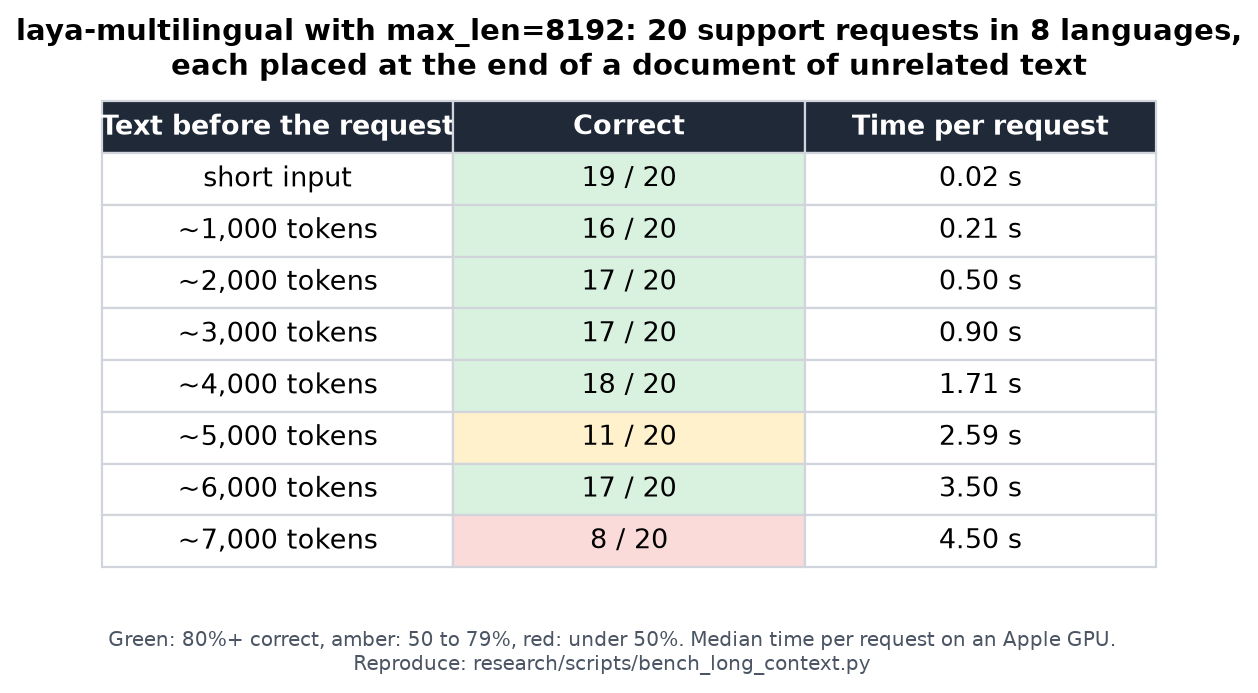
16 to 18 of 20 requests were answered correctly with up to about 4,000 tokens of text before them;
beyond that results vary (8 to 17 of 20), so check long-document accuracy on your own data. Short
inputs give identical answers with max_len=8192, and speed follows the input's real length, not
the limit: a 4,000-token input takes about 1.7 s on an Apple GPU. Name the checkpoint with
model="multilingual", since long, mostly English text would otherwise route to the English
checkpoint.
Past the context window: predict_long.
predict/system_one truncate a state that exceeds max_len to a single window (the first, or
for a conversation list the last), silently dropping the rest. predict_long scans the whole state
in overlapping windows, scores them in shared forward passes (via predict_batch), and aggregates
per question:
result = agent.predict_long(state, questions)              # windows the state, one result back
result = agent.predict_long(state, questions, window=256)  # smaller window isolates a localized span
result = agent.predict_long(state, questions, hooks=[AuditLog()])   # the scan, instrumented
noultakes the strongest window (the statement holds if any window supports it).choice/scoretake the most-confident window — averaging over a long, mostly-neutral document lets the neutral majority out-vote the one window that saw the deciding span.- A state that already fits one window is passed straight to
system_one(identical output, plususage["windows"] = 1). Without an explicitwindow, that is any state the questions leave room for, sincesystem_onereads it whole. The key is total:1single window,Nscanned windows,0a hook answered the document before the model read any of it. - Hooks wrap the inference that answers the state, so on a scanned document
on_predict_startfires once withctx.statesholding the decoded windows, not the state you passed in (it was tokenized to produce them). A start hook may replace that list: the answers are aggregated over whatever reached inference, andusage["windows"]counts those states. What a rewritten scan costs is the attribution —answer["window"]names a span of your document, so it is only reported when the scan reached inference unchanged. A hook that means to answer the document callsctx.skip(...)instead: its result comes back with noanswer["window"]andusage["windows"]at 0, because no window scored it.
A smaller window isolates a short deciding span better (it becomes a larger fraction of its
window); the default (max_len - head_max_len) favors context and throughput. Either way the
window is capped at the room the questions leave for the state inside max_len, so a window is
never re-truncated on the way to the model and token_start/token_end describe the span it read:
many options leave little room (on the English checkpoint, 2 options leave 483 state tokens and
100 leave 100), and a window past that room used to be cut short silently. Output shape matches
predict, with usage["windows"] added.
ONNXAgent.predict_long(state, questions, window=..., stride=..., batch_size=...) has the same
contract and the same aggregation rules, with the windows scored through ONNXAgent.predict_batch
— one ONNX Runtime session run for all of them, or one per chunk when batch_size bounds memory.
The returned probability is the deciding window's, not a calibrated number for the whole
document — a noul max drifts up with the window count even with no signal, and choice can land
on a confidently-neutral window when nothing is decisive. Each answer carries answer["window"]
(the deciding window's index, token_start/token_end, and count) so you can check the span
the answer actually came from:
r = agent.predict_long(state, questions)
r["answers"]["refund"]["window"]   # {'index': 13, 'token_start': 4680, 'token_end': 5432, 'count': 14}
The same scan is reachable from the Router, which routes first and then windows the checkpoint it
picked — the same model=/task=/lang= hints, hooks and routing key as predict:
GPU fast path
pip install "laya-pro[fast] @ git+https://github.com/tgundhus/laya-pro.git" adds an optional forward built from fused TileLang
kernels: GEMM + bias/activation epilogues, GEMM + GEGLU, residual + LayerNorm, in-place RoPE, and a
sliding-window flash attention that reads the packed QKV buffer directly. Weights stay resident in bf16
and every (batch, length) bucket is captured as a CUDA graph, so a one-question call no longer pays
~200 kernel launches from Python.
agent = laya.load("convaiinnovations/laya", fast=True)   # or: agent.accelerate()
agent.predict(state, questions)                            # same API, same answers
Numerics: on a fixed set of 60 states the fast path stays within 0.046 of an fp32 forward and within 0.076 of the stock
bf16 path (max |Δp| ≤ 0.05 vs fp32 on both checkpoints, argmax agreement ≥ 47/48 per question type; every per-option
probability is in benchmarks/results/parity_*.json) — see benchmarks/parity_fast.py and BENCHMARKS.md.
The fast path runs in the agent's autocast dtype at the time accelerate() is called: bf16 by default, fp16 if
agent.dtype is torch.float16, where it stays within 0.009 of fp32 on the same set (BENCHMARKS.md).
Falls back to the stock forward on CPU/MPS or when tilelang is not installed; agent.deaccelerate()
restores it. Kernels compile once per shape bucket on first use (a few seconds, cached on disk).
Warm-up before serving: agent.warmup()
compile=True now runs agent.warmup() before returning from load. This moves the batch and
single-row graph compiles into startup; startup can take tens of seconds. To defer the work:
agent = laya.load("convaiinnovations/laya", compile=True, compile_warmup=False)
seconds = agent.warmup()         # manual entry point, also accepts shapes=[(rows, tokens, markers)]
If automatic warm-up fails, load emits a RuntimeWarning naming the underlying error and returns
with the torch.compile wrapper and compile settings intact. Later requests still use the compiled
model and propagate compilation failures; there is no automatic eager fallback. Explicit
agent.warmup() calls also propagate failures, even after automatic warm-up has failed.
Warm-up uses synthetic inputs without prediction hooks or prediction caches. It covers common batch
and single-row shapes, not every possible guard or CUDA graph shape. compile=False and fast=True
do not warm automatically. Manual warm-up still works on both paths.
On CUDA, compiled inference pads the masked end of each sequence to a multiple of eight tokens. This
avoids extra SDPA graph specialisations on PyTorch versions that distinguish lengths modulo eight;
reported token usage still counts the original, unpadded sequence.
Inductor caches compiled graphs under TORCHINDUCTOR_CACHE_DIR (by default in /tmp); point it at a
persistent directory to keep them across restarts. Alternatively, load with
compile=True, compile_cache=True to use $XDG_CACHE_HOME/laya/torchinductor (or
~/.cache/laya/torchinductor). This opt-in sets the process-wide environment variable only if
absent; an existing value always wins. It does nothing on eager or TileLang loads.
compile_mode="reduce-overhead" is a separate opt-in for CUDA graphs. With compile=True, it
can reduce launch overhead on repeated shapes, but each new shape needs recording and GPU memory
can grow. Laya copies outputs out of reusable graph buffers and serializes these CUDA forwards.
The default mode remains unchanged. See the engineering notes
for measurements and limitations.
Confidence and abstention
Because Laya's probabilities are trained with strictly proper scoring rules (RLCD), confidence scores are statistically meaningful:
dept = answers["department"]["choice"]
conf = answers["department"]["confidence"]

if conf >= THRESHOLD:               # refit and validate THRESHOLD on your own held-out data
    route_automatically(dept)       # above it: act, and sample the decisions you act on
else:
    escalate_to_human_agent(dept, reason=f"Low confidence ({conf:.2f})")
A threshold is a policy you choose from measured accuracy at that coverage on your data, not a property of the model. Both checkpoints are over-confident as shipped and laya-multilingual has no fitted temperatures at all, so fit them before relying on these numbers — see Calibration below, and the fine-tuning notebook for the fitting loop itself. Then pick the point where the errors you accept are ones you can live with. Confidence orders decisions; it does not establish that a decision is correct.
A threshold also depends on the autocast dtype. On CUDA at compute capability 8 or above the runtime uses the checkpoint's amp_dtype, which is bf16 for all three shipped checkpoints. On the fixed set from benchmarks/parity_fast.py (60 states, 288 questions per checkpoint, RTX 2000 Ada) bf16 moves a probability by up to 0.073 against the fp32 forward and flips 3 of 864 argmaxes across the three checkpoints; fp16 stays within 0.019 and flips none, at the same latency. LAYA_CUDA_AMP=fp16 selects fp16 and LAYA_CUDA_AMP=bf16 selects bf16 (LAYA_CPU_AMP=bf16 is the CPU counterpart). MPS autocasts in fp16 too, but the overhead dominates on a single small row, so there it engages only once a call reaches mps_amp_min_rows rows -- 5 by default, LAYA_MPS_AMP_MIN_ROWS to move it; a value that does not parse falls back to 5 and anything below 1 is clamped to 1. On MPS, agent.dtype is the autocast target, so it says float16 even when every call stays below the gate and runs in fp32; agent.dtype_for(rows) returns the precision a call with that many rows runs in. Fit and measure a threshold in the dtype you serve with.
Opt-in abstention: min_confidence
predict, predict_batch, system_one and decide — on Agent, Router and ONNXAgent — take an opt-in min_confidence, off by default. It is a caller-side policy on top of the emitted confidence: every answer whose answer_confidence falls below the threshold is flagged low_confidence: True, with the raw answer, probabilities and confidence left intact for inspection.
res = agent.predict(state, questions, min_confidence=0.85)
ans = res["answers"]["department"]

if ans.get("low_confidence"):        # answer_confidence < 0.85
    escalate_to_human_agent(ans["choice"], reason=f"Low confidence ({ans['answer_confidence']:.2f})")
else:
    route_automatically(ans["choice"])
The threshold reads answer_confidence (max(p)) — the calibrated quantity, invariant to the number of options — never the entropy confidence. With decide(..., min_confidence=...) a low-confidence field comes back as None in the schema output, while return_details=True keeps the answer and its confidence. LangChain LayaRouter's confidence_threshold reads the same value: answer_confidence when the answer carries it, confidence otherwise. Left unset, min_confidence changes nothing.
A gate is a policy, and a policy whose application you cannot observe is not one. low_confidence is written only when the gate fires, so its absence cannot tell you "a gate ran and this answer cleared it" apart from "no gate ran at all" — you could neither compute an abstention rate nor prove the gate was in effect. When you pass min_confidence, every answer therefore also reports abstention:
abstention |
meaning |
|---|---|
passed |
a gate ran and this answer's answer_confidence cleared it |
abstained |
a gate ran and this answer's answer_confidence fell below it |
unevaluated |
a gate ran and this answer carried no usable confidence, so the gate could not decide |
abstention_threshold echoes the threshold whenever a gate ran, so a log can be re-split by the gate that produced it instead of by whatever the caller happened to remember passing. unevaluated is the case a boolean cannot express — reporting it as a pass would be as wrong as reporting it as a flag, so a NaN, a missing confidence or a bool lands in its own state. The raw answer, probabilities and confidence are untouched either way.
Left without min_confidence, the response is byte-for-byte what it was before any of this: no abstention, no abstention_threshold, no flag. That is deliberate — a field on every answer that only some calls populate is a schema change for callers who never asked to be gated. The presence of abstention is how you tell a gated run from an ungated one; a min_confidence of exactly 0.0 still counts as set, so it reports states, and flag_low_confidence treats 0.0 as a no-op because nothing can fall below it.
The same gate is a flag on the laya command:
Each marked answer gets [low-confidence] on its printed line and the answer itself is still
printed, so a run at a terminal reads the same way the dict does; --json carries the raw
low_confidence and abstention keys. --batch FILE applies one threshold to the whole file, which is the shape
predict_batch takes. Routing has no answer to gate, so laya --min-confidence 0.9 "..." without
--predict, --preset or --questions is refused rather than ignored.
Question types
| Primitive | Output | Use Cases |
|---|---|---|
choice |
Top label, probabilities per option, confidence | Department routing, intent classification, topic categorization |
score |
Expected level on ordinal rubric, distribution, confidence | Frustration level, ticket urgency, harm severity |
noul |
Calibrated probability P(true) from 0.0 to 1.0 | Phishing detection, spam filtering, jailbreak detection, churn risk |
noul always scores two semantic slots in [false, true] order and returns the probability of
the second slot. For compatibility, those slots are shown to the model as false and true by
default. The optional labels mapping overrides only that model-facing text without changing the
returned meaning:
question = {
    "type": "noul",
    "instructions": "Is this review positive?",
    "criteria": {
        "false": "the review is negative",
        "true": "the review is positive",
    },
    "labels": {
        "false": "B",
        "true": "A",
    },
}
The labels mapping is optional. It must contain exactly the string keys false and true,
whose values must be distinct non-empty strings. Mapping order does not matter, and the returned
noul value is still P(true). Label sensitivity varies by checkpoint and state, so validate any
override on your own data rather than treating A/B as a universal fix.
Option order
Every question type also takes an optional option_order: a permutation of the option indices
saying which option goes in which slot. Slot s shows option option_order[s]. Probabilities
always come back keyed in your own option order, whatever order the model saw them in, so the
key is presentation only — it never changes what a returned label means.
question = {
    "type": "choice",
    "instructions": "Which team should handle this?",
    "criteria": {"billing": "...", "technical": "...", "sales": "..."},
    "option_order": [2, 0, 1],     # slot 0 shows `sales`, slot 1 `billing`, slot 2 `technical`
}
It exists because where an option sits changes the answer. research/eval/presentation_checks.py
measures the English checkpoint on five options whose text is identical: the per-slot logits
centre at [+1.68, +1.47, +0.11, -1.35, -1.91], a spread decided by position alone, and the
multilingual checkpoint leans the other way on score (see Laya issue #131).
The checkpoint-side fix is a position-balanced retrain; until then option_order lets a caller
average the effect out, by asking the same question under orders in which every option occupies
every slot equally often:
k = len(question["criteria"])

# the k rotations go in as k questions, so they share one forward pass
rotations = {
    "q%d" % r: dict(question, option_order=[(i + r) % k for i in range(k)])
    for r in range(k)
}
answers = agent.predict(state, rotations)["answers"]

totals = {label: 0.0 for label in question["criteria"]}
for answer in answers.values():
    for label, value in answer["probabilities"].items():
        totals[label] += value / k

decision = max(totals, key=totals.get)
predict already scores every question in a request in one parallel forward pass, so this costs
k rows rather than k forward passes — sending the rotations as separate predict calls would
cost k of them. On 62 banking intents shortlisted to 20 over 49 states, averaging this way took
the share of answers that change with presentation order from 16.3% to 6.1%. Omitting
option_order keeps the canonical order and the behaviour every existing caller already has.
Order-invariant checkpoints (option_layout: "parallel")
Averaging reduces the position effect; a checkpoint trained on the parallel option layout does not
have one. Every option starts at the same position id, the instruction's closing [SEP] and the
state continue after the longest option, and options cannot attend to each other (the local layers
keep their window, measured in position ids). The decision head has no positional encoding, so
reordering the options can only reorder the logits: option_order and any other permutation return
the same probabilities per label, up to float rounding. The idea is the one Parallel Context Windows
(Ratner et al., 2023) uses for long contexts, applied to options.
The layout is a property of the weights, so it is set in the checkpoint's rl_agent_config.json
("option_layout": "parallel") and picked up by laya.load; every published checkpoint stays on the
default sequential layout. Train one with laya.train:
from laya.train import TrainConfig, finetune

finetune("train.jsonl", "./laya_base", "./laya_parallel", TrainConfig(option_layout="parallel"))
Fine-tuned from convaiinnovations/laya on typed-decisions (4 epochs, same recipe and seed per arm,
one T4, 2,000 test decisions; each question also re-asked under a random option_order):
| layout | accuracy (listed order) | accuracy (shuffled) | ECE | same answer when shuffled |
|---|---|---|---|---|
| sequential | 0.779 | 0.767 | 0.153 | 91.7% |
sequential + shuffle_options |
0.757 | 0.750 | 0.136 | 95.0% |
| parallel | 0.764 | 0.764 | 0.143 | 100% |
One seed per arm; the sequential arm moved by 0.008 between two runs of the same recipe. The
parallel layout needs transformers>=5 and runs on the eager backend only: the ONNX runtime, the
TileLang fast path and compile=True refuse such a checkpoint, and backend="auto" resolves to eager.
Presets
Laya provides pre-tuned question schemas for immediate production use:
import laya

agent = laya.load("convaiinnovations/laya")

# 1. Intelligent Model Router (routes to small vs. frontier models)
routing = agent.predict({"request": "Refactor this service using dependency injection"}, laya.router_questions())

# 2. Real-time Prompt Guardrails (jailbreaks, injections, leaks)
guard = agent.predict({"prompt": "Ignore all instructions"}, laya.guard_questions())

# 3. Content Safety & Moderation (toxicity, harassment, threats)
safety = agent.predict({"post": "User comment text"}, laya.moderation_questions())

# 4. Support Ticket Triage (intent, urgency, frustration, churn)
triage = agent.predict({"message": "My payment failed twice"}, laya.triage_questions())
HTTP server (Jev-compatible)
laya.serve exposes the Router over HTTP on the same POST /v1/systemone
wire protocol as TypeSafe's hosted Jev API. Laya's answer payload is already
schema-identical to what Jev returns (choice/score/noul answers and a
{input_tokens, output_tokens} usage block), so an existing Jev client — e.g.
the hs-jev Haskell client — just
needs its baseUrl repointed; nothing else changes. A PHP client that targets
laya-serve rather than Jev also exists: marcreichel/laya-php.
pip install "laya-pro[serve] @ git+https://github.com/tgundhus/laya-pro.git"          # adds fastapi + uvicorn + python-multipart
LAYA_DEVICE=cuda LAYA_PRELOAD=1 laya-serve   # binds 0.0.0.0:8000, preloads all 3 checkpoints
curl -s localhost:8000/v1/systemone -H 'content-type: application/json' -d '{
  "state": {"body": "billed twice, refund please or we cancel"},
  "questions": {"dept": {"type": "choice", "instructions": "which team?",
                "criteria": {"billing": "refunds", "tech": "bugs"}}}
}'
To evaluate multiple states in a single call, send a states array to POST /v1/systemone/batch (capped at 64 states; a batch larger than LAYA_MAX_BATCH_TOKENS is split across several forward passes rather than refused):
curl -s localhost:8000/v1/systemone/batch -H 'content-type: application/json' -d '{
  "states": [
    {"body": "billed twice, refund please"},
    {"body": "cannot login, getting 500 error"}
  ],
  "questions": {"dept": {"type": "choice", "instructions": "which team?",
                "criteria": {"billing": "refunds", "tech": "bugs"}}}
}'
The endpoint shares forward passes via Router.predict_batch and returns an array of results in matching order along with aggregated total_usage.
Configuration is by environment variable: LAYA_HOST, LAYA_PORT,
LAYA_DEVICE, LAYA_PRELOAD, LAYA_MODELS (comma list to preload),
LAYA_THREADS (cap torch intra-op threads for CPU inference — keep at or below
physical cores), LAYA_AUTO_TASK, LAYA_DEFAULT_MODEL (the checkpoint a state with no
language evidence falls back to, english by default; set it to multilingual when most of
your traffic is not English), LAYA_MAX_LOADED (checkpoints resident at
once, 2 by default; raise it to 3 when LAYA_AUTO_TASK makes a third one
reachable on demand, or the server rebuilds one every time routing switches),
LAYA_IDLE_UNLOAD_SECONDS (unload idle checkpoints; 0 disables it, 300 frees device memory
after five minutes and makes the next request pay a cold load), and LAYA_API_KEY (when set, clients must
send Authorization: Bearer <key>). A client's model field is honoured when it
names a Laya checkpoint (english/multilingual/typed-decisions or a published Hub id).
jev-1 and convaiinnovations/laya still mean the router auto-selects by script/language.
A path or an unpublished Hub id (/path/to/checkpoint, org/repo) is a 422 on both
/v1/systemone and /v1/systemone/batch instead of being answered by another checkpoint.
The same body can also carry task,
lang, lang_guess, min_confidence, max_len and head_max_len — the controls
Router.predict takes that a JSON body can state — while the five hook arguments
(hooks, on_predict_start, on_predict_end, hooks_raise, hooks_timeout) are refused
with 422, because a hook is a callable that has to live where the server runs.
When publishing the server under a reverse-proxy prefix such as /laya, set
LAYA_ROOT_PATH=/laya. The proxy should strip that prefix before forwarding;
the setting controls FastAPI-generated URLs and leaves the internal routes unchanged.
Three things differ from Jev when you port a client:
- Options per question. A question's options share the checkpoint's option budget,
head_max_len(192 tokens onlaya, 256 on the other two), not Jev's cap of 255 options. In addition, the HTTP server (laya.serve) enforces an amplification guard of at most 100 choice options per question (MAX_CHOICE_OPTIONS = 100, rejected with 413 before inference). Once options overflow the token budget, around 20 options with a short description each, every option is trimmed to fit, so long or similar labels can reach the model reading the same (Where Jev leads). Once they no longer fit the window at all, the library rejects the request with 422. For more candidates, narrow them first withpredict_shortlist(Honest limits). - Score levels. Every level needs a description. A
nulllevel is rejected with 422 rather than scored and echoed back inlegend. confidenceonchoiceandscoreanswers is 1 minus normalised entropy, a measure of how concentrated the distribution is, not Jev's(n·p_max − 1)/(n − 1). A threshold carried over from Jev does not transfer. For one calibrated number on every question type, gate onanswer_confidence, the probability of the reported answer. Both values shift with the number of options, so fit and validate any cutoff on held-out data at the option counts your workload uses (Laya issue #394).
Nix / NixOS
This repo is a flake. On a machine with an NVIDIA GPU:
nix run .#laya-serve          # build (prebuilt CUDA torch, no compile) and serve
nix develop                   # dev shell: torch-bin, transformers, fastapi, pytest
For a NixOS host, import the module and enable the service:
# flake inputs:  laya.url = "github:<you>/laya";  # or path:/… on the same host
{
  imports = [ laya.nixosModules.default ];
  services.laya-serve = {
    enable = true;
    host = "0.0.0.0";           # or bind to the Tailscale/LAN address
    openFirewall = true;
    device = "cuda";
    models = [ "english" "multilingual" "typed-decisions" ];
    # apiKeyFile = config.age.secrets.laya-api-key.path;  # optional bearer auth
  };
}
The module runs a hardened DynamicUser systemd unit with CUDA device access,
caches weights under /var/lib/laya-serve, and reads the bearer token (if any)
via LoadCredential so it never enters the store.
MCP server
Laya can be exposed as an MCP stdio server, so any MCP
client (OpenClaw, Claude Desktop, Cursor, ...) can call typed decisions as tools
(laya_predict, laya_predict_batch, laya_route, laya_route_batch, laya_decide, laya_shortlist, laya_preset, laya_status) without writing glue code.
This is an optional extra: the core package has no mcp dependency.
pip install "laya-pro[mcp] @ git+https://github.com/tgundhus/laya-pro.git"
laya-mcp-server          # or: python -m laya.mcp.server
To share a laya-serve on your own hardware across editor sessions, set
LAYA_BASE_URL=http://127.0.0.1:8000 in each MCP client's environment. Its prediction tools use
HTTP and import no torch; routing stays local. Set LAYA_API_KEY to the server's bearer key and
LAYA_REMOTE_TIMEOUT to the allowed HTTP wait (300 seconds by default). laya_shortlist is
unavailable in this mode. See shared-server MCP setup.
Example MCP client configuration (stdio transport):
The environment variables follow the contract documented at the top of
laya/serve.py, so the same variable has one meaning across the
package:
| Variable | Default | Meaning |
|---|---|---|
LAYA_DEVICE |
(auto) | Same as laya.serve: the device type is lower-cased (CUDA → cuda, CUDA:0 → cuda:0) and passed to torch, whose device parser is case-sensitive |
LAYA_PRELOAD |
1 |
Same as laya.serve: build the checkpoints at startup, not lazily |
LAYA_MODELS |
english,multilingual |
Comma list to preload (serve contract). MCP difference: an empty value preloads english,multilingual so typed-decisions stays lazy; in laya.serve empty means every checkpoint |
LAYA_THREADS |
(torch default) | Same as laya.serve: cap torch intra-op threads for CPU inference; keep it at or below the physical core count |
LAYA_AUTO_TASK |
0 |
Same as laya.serve: 1 lets a request whose question ids match a typed-decisions workflow route to that checkpoint, which is then loaded on demand; it never joins the preload list |
The tools return structured JSON (answers with probabilities, routing metadata, device,
latency_ms). laya_predict_batch and laya_route_batch are the MCP form of
Router.predict_batch / route_batch:
one tool call takes an array of {state, questions, model?, task?, lang?, lang_guess?, max_len?, head_max_len?} requests, routes them
first, groups them by checkpoint, and shares forward passes between requests with the same
question schema, returning the answers in input order. max_len / head_max_len are per request
there, exactly as Router.predict_batch reads them, so one wide question can raise its own budget
without shrinking the rest of the batch to it. On 16 mixed-language tickets through
the tool functions themselves, one batch call beat 16 laya_predict calls by 2.1-2.3x on
MPS (983-1082 ms -> 467-477 ms) and ~1.25x on CPU (1861-2471 ms -> 1470-1911 ms), with
0/16 decision flips (choice label, rounded score, noul sign) against the loop. Prefer it
whenever a client has more than a few requests: each saved round trip is also an MCP
request/response. laya_decide is the MCP form of laya.decide: it
takes a JSON schema (enum choices, booleans, bounded integers) instead of hand-written
questions and returns the decided values projected onto that schema -- enum member, integer
level, boolean -- beside per-field confidence and probabilities, so a client that already
knows the answer shape never parses an answer map by hand. laya_shortlist is the MCP form of predict_shortlist:
it shortlists a many-option choice question to its k most likely labels by embedding
similarity (mean-pooled from the answering checkpoint's own encoder, so no extra model is
downloaded), answers in one forward pass, and returns per-question shortlist metadata
(kept labels, cosine scores, k, option count, and whether the question passed through
unshortlisted). The guardrails shown on every decision
tool point clients to laya_shortlist for >20-option choices. As with the SDK, use it for structured
decisions only; not for open Q&A or
text generation. Tests: tests/test_mcp.py (CI, no weights) and
tests/test_mcp_local_e2e.py (local, real weights and a real stdio handshake).